Text Messages
Last updated August 24, 2026
Fluid builds and runs AI agents that do repetitive office work for small businesses. A customer can choose to be texted when one of their own agents has prepared something that needs them, or has stopped working.
This page explains exactly how somebody agrees to those texts, what the texts say, and how to stop them. Agreeing happens inside a Fluid account, which needs a login, so the whole flow is written out here for anyone who needs to see it without one.
Fluid is operated by Fluid LLC, an Iowa limited liability company based in Johnston, Iowa. The app is at agents.makeitfluid.com. If anything here is unclear, email help@makeitfluid.com and a human will answer.
Who receives them
- Only a signed-in Fluid customer, and only about the agents in their own account.
- Only a number that person typed themselves and then confirmed with a code we texted to it. Nobody can add a number on anyone else’s behalf, and no one else in the same company can see or change it.
- We never send marketing or promotional texts. We do not buy, rent, import, or share phone number lists.
- Texts are never required. Everything Fluid does works the same without them, and email is always available instead.
How you opt in, step by step
- Sign in to your Fluid account at agents.makeitfluid.com.
- Open How you hear in the sidebar. The address is agents.makeitfluid.com/notifications.
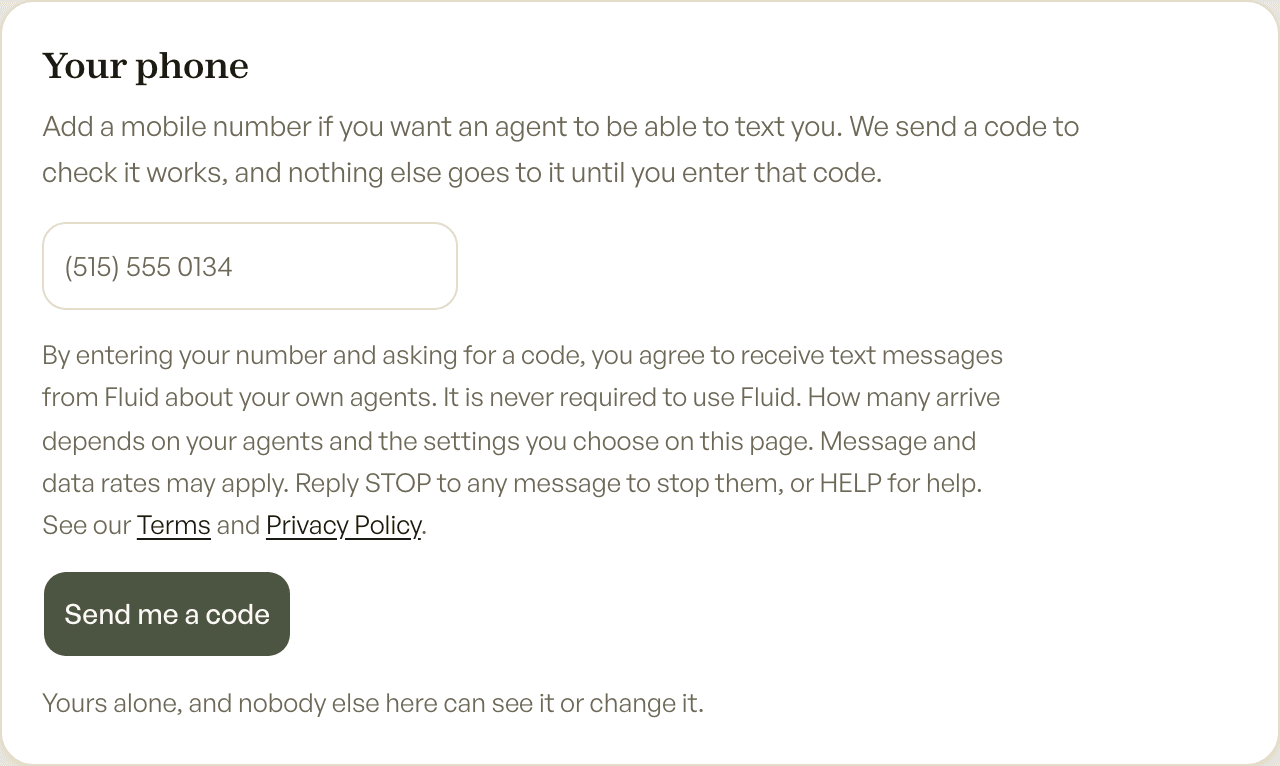
- Under Your phone, type your own mobile number into the empty box. The box starts empty. Nothing is filled in, ticked, or agreed to in advance.
- Read the consent wording, which sits between the box and the button. It is quoted in full below.
- Press Send me a code. Pressing that button is the act of agreeing, and it is the only way to start receiving texts.
- We text a six digit code to the number. That code is the only thing that number ever receives until it is confirmed, so a number typed by mistake gets one message and nothing more.
- Type the code back into the screen. The number is now confirmed.
- Choose, for each agent separately, whether it should tell you as soon as something needs you, and whether that comes by email, by text, or both. Every agent starts at no text at all until you say otherwise.
The consent wording, word for word
This is what the screen says, between the number box and the button that submits it:
“By entering your number and asking for a code, you agree to receive text messages from Fluid about your own agents. It is never required to use Fluid. How many arrive depends on your agents and the settings you choose on this page. Message and data rates may apply. Reply STOP to any message to stop them, or HELP for help. See our Terms and Privacy Policy.”
“Terms” and “Privacy Policy” are links on that screen, to the same two documents linked at the bottom of this page.
What that screen looks like
A picture of the opt-in, taken from the running product:
What the messages say
There are two, both about the account holder’s own work. Names and numbers change; the wording does not.
- Confirming a number. “Fluid: your verification code is 481902. It expires in 10 minutes.”
- An agent needs you. “Fluid: Late Invoices has 2 things waiting for you. agents.makeitfluid.com Reply STOP to opt out, HELP for help.”
How often they arrive
It depends entirely on the customer’s own agents and the settings they chose. Nothing is sent on a schedule and nothing is ever sent to promote anything. An agent texts only when it has prepared work that needs a person, or when it has stopped and cannot carry on. Most customers who turn this on receive a few messages a week. Message and data rates may apply.
How to stop them
- Reply STOP to any message. That stops them straight away. We record it and stop trying rather than sending again.
- Reply HELP to any message for help, or email help@makeitfluid.com.
- Or remove the number, or turn an individual agent down to email only, on the same screen where it was added.
Your number and who sees it
We do not share or sell mobile numbers, or the fact that you consented to be texted, to anyone for marketing purposes. The number is used to deliver the messages you asked for and nothing else. It goes to Twilio, because Twilio is what sends them, and to nobody else. The full detail is in our Privacy Policy, and the agreement every customer accepts is in our Terms of Service.